Bring your own coding agent: what an ops layer adds to Claude Code, Cursor and Copilot
Teams do not want a second assistant; they want the one they already pay for to produce work somebody can account for. So the ops layer is deliberately tool-agnostic: it hands out a brief and a branch name, reads back what git and CI report rather than what a model claims, takes one HTTP call from any pipeline, and books every run against the work item it was made for. Six connection points, none of which require a plugin in anyone’s editor.
The most common question we get is not “is this better than Cursor”. It is “we already pay for Claude Code and half the team lives in Copilot — where does this sit?” The short answer: underneath, not next to. Your assistant writes the code. The ops layer is what turns that into work somebody can account for six months later.
The design constraint that follows is the interesting part. If we cannot know which tool wrote the code, then every connection point has to be something the tool already produces anyway. There are exactly four of those — a ticket, a branch, a pipeline run, and a bill — and everything below hangs off them.
Why there is no plugin, and why that is the feature
An integration built for a specific assistant has to be rebuilt for the next one, and teams change assistants roughly as often as they change opinions about them. Worse, an integration inside the tool is an integration the tool can bypass: if the guarantee lives above the point where work happens, it can be routed around, and a guarantee that can be routed around is a convention.
So we support other AI tools the way a delivery pipeline supports a compiler: by not caring which one it is, and by refusing to accept its word for anything. That sounds unfriendly. In practice it is what makes “use whatever you like” a safe thing for a lead to say.
1. The model you already pay for does the code work
Turnado splits work into three kinds and picks one model per kind. Code work is explicitly yours to choose: ten models sit in the catalogue, you can connect your own key for Claude, OpenAI, Mistral or Gemini, and there is a catalogue entry whose whole purpose is to point at an endpoint we do not operate — on-premise or your own cloud, with the model name supplied by you because only you know it.
Work that runs on your own key runs on your contract and does not count towards your Turnado AI allowance. That is not generosity; it is the honest accounting of who is buying the tokens. How to wire it up is in choosing a model per kind of work.
2. Work leaves with a brief and an address
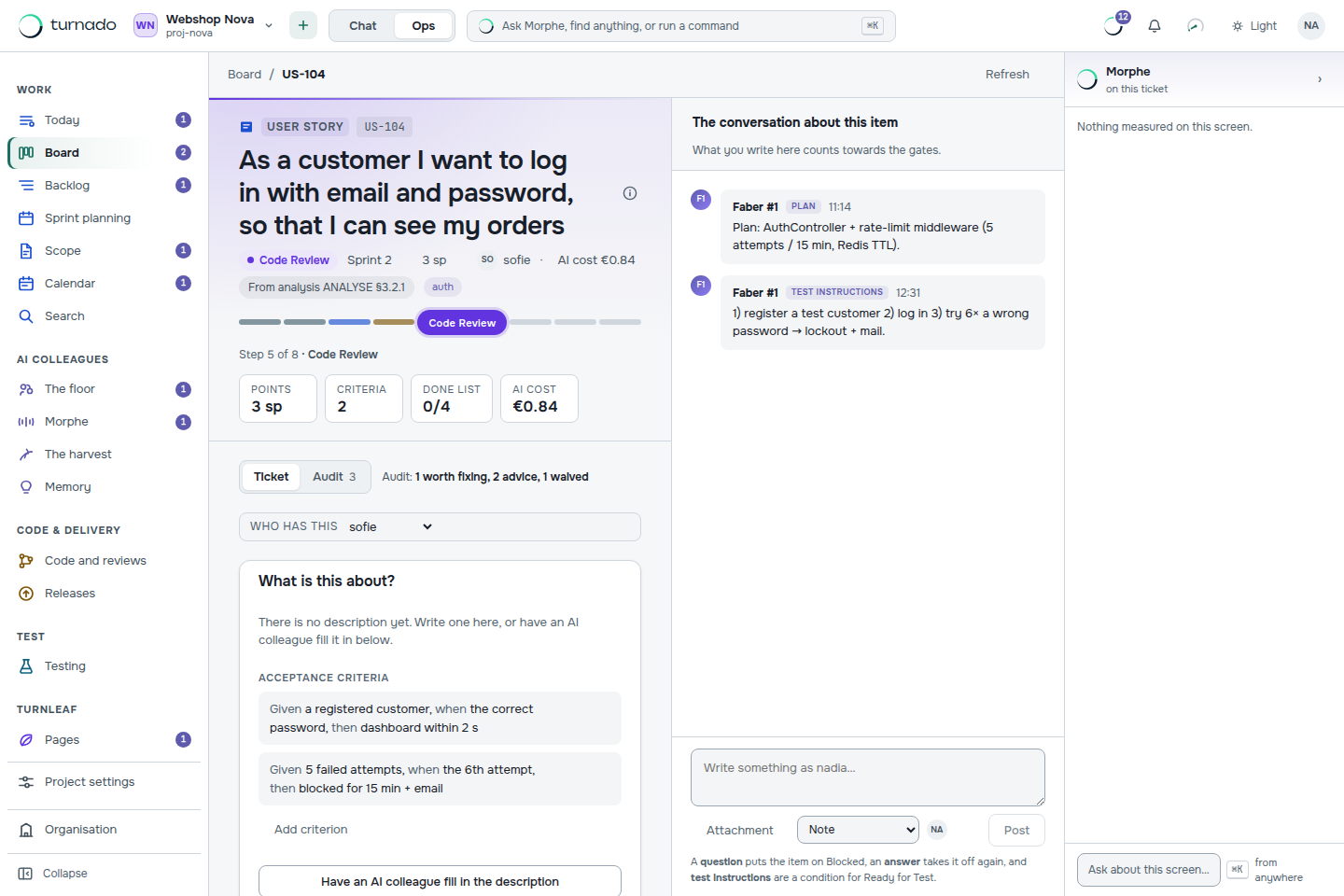
The failure mode of an assistant is not bad code; it is confident code for the wrong requirement. What travels from the board is therefore a work item that could not have left the first status without acceptance criteria on it, plus a branch name derived from the item itself — feature/US-104-login, from a pattern you can change per project.
That branch name is doing more work than it looks. It is how everything downstream finds its way back: a commit message, a pull request title and a branch are all scanned for work item IDs, and a branch belonging to another item is flagged before a pull request exists at all. Paste the ticket into whichever assistant you use, work on that branch, and the trail assembles itself.
3. What comes back is read, not accepted
This is the pivot the whole layer turns on. A pull request is translated into gate facts: is it open, does it carry commits linked to this item, are the checks green, was a review approved — and separately, was it approved by a human, because items tagged for payment or security are not allowed to settle for an agent’s review.
Each of those is a plain function of state, evaluated outside any model. Nine statuses, sixteen transitions, eighteen conditions on those transitions. Your assistant can be as confident as it likes; ci_green reads what your pipeline reported and nothing else. And fourteen permissions are removed from every agent after its roles are resolved — merging, releasing to production, changing the workflow, rewriting the audit log — so the tool that wrote the code cannot be the tool that signs it off.
4. Any pipeline reports in with one call
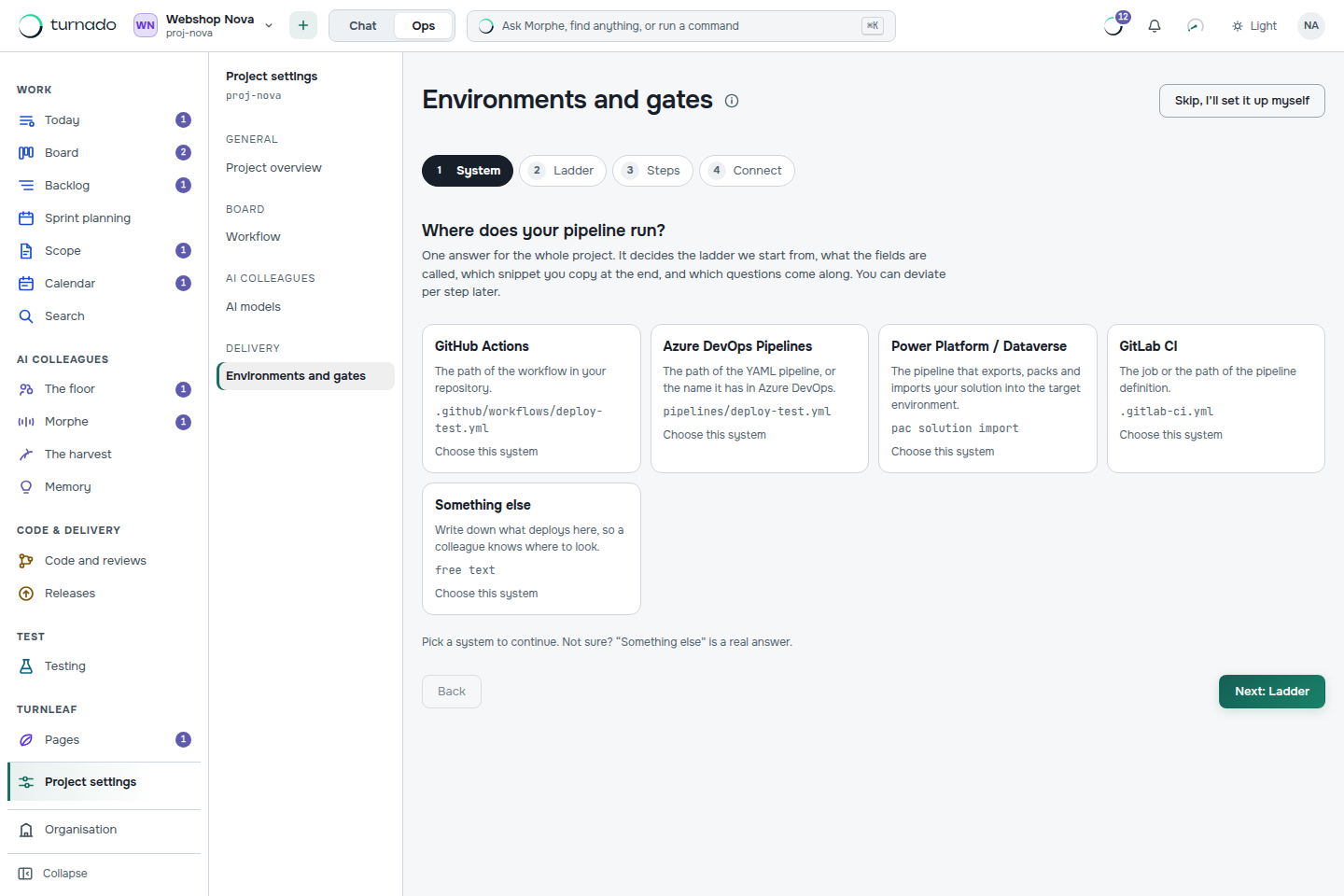
Turnado does not deploy anything, and says so on the screen where you would expect it to offer. What it does is listen. Five delivery systems are described as data — GitHub Actions, Azure DevOps Pipelines, GitLab CI, Power Platform, and “something else” — and each one hands you a copy-pasteable snippet with the environment key already filled in, so the acceptance pipeline cannot accidentally open the test gate.
curl -sS -X POST "$TURNADO_URL/api/webhooks/deploy" \
  -H "authorization: Bearer $TURNADO_CI_TOKEN" \
  -H "content-type: application/json" \
  -d '{"environment":"test","success":true,"branch":"'"$BRANCH"'"}'
One organisation token, one environment variable name across every platform, and the deploy gate opens because something outside Turnado said it deployed. Adding another CI system is one entry in a list; no screen changes. The full walk-through is in setting up delivery.
5. The bill lands on the work item
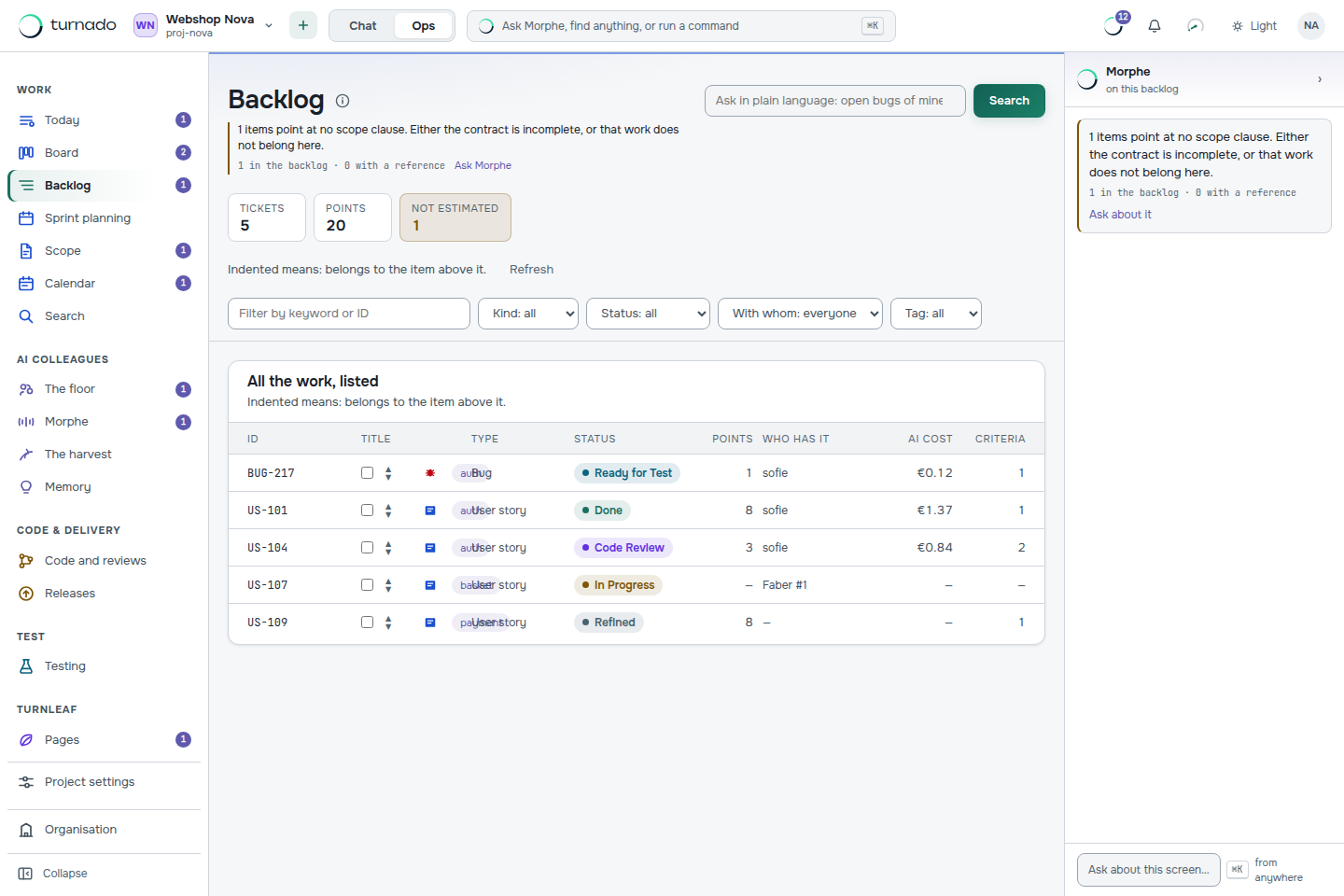
Whatever tool did the work, the run is recorded against the item it was made for: which model, how many tokens, how long it took, what it cost. That turns “what did this feature cost” from an estimate into a query, and it is the number an agency passes on to its own customer, next to the hours people booked.
There is a ceiling too. A task that becomes more expensive than its maximum does not silently continue — the AI colleague stops and asks a person how to proceed, with the limit named in the message. What that costs in practice is worked through in what an AI coding agent costs.
6. The rest of your chain hears about it
Outgoing webhooks carry events such as item.status_changed to whatever else you run: a Slack bridge, a data warehouse, a customer portal. The shape is deliberately Stripe’s, because that is the one every developer has already implemented once — a timestamped HMAC signature, an idempotency key stable across attempts, at-least-once delivery, and retries at 10 seconds, 1 minute, 5 minutes, 30 minutes and 2 hours before a message lands in a dead letter queue you can replay by hand.
What this deliberately does not do
- No editor extension. Nothing to install next to your assistant, and nothing that breaks when it updates.
- No deploying. Turnado guards the ladder and listens to it. Your pipeline stays yours.
- No layer on top of Jira. A guarantee that sits above the integration point can be bypassed through it, so Turnado is the board rather than a skin over one.
- No opinion about which assistant you use. Including the possibility that it is the same model family we recommend for code work anyway.
A realistic first week
- Connect a repository, and keep every editor and assistant exactly as it is.
- Paste one analysis document into the intake and let it become epics, features and stories with acceptance criteria.
- Put your own model key in for the code lane, so that work runs on your contract.
- Add the four-line snippet to the pipeline that already deploys to your test environment.
- Run one story end to end and look at what the ticket knows afterwards that a chat history would not.
Can I keep using Claude Code, Cursor or Copilot with Turnado?
Yes — that is the intended setup rather than a concession. Developers keep their editor and their assistant; what changes is that the work they pick up arrives as a ticket with acceptance criteria and a branch name, and what they finish is judged by conditions calculated from git and CI instead of being declared finished.
Which AI coding tools does Turnado support?
All of them, because it does not integrate with any of them. The connection points are a work item, a branch name carrying the item ID, a pull request read for gate facts and a pipeline that reports back over HTTP — things every assistant produces anyway. There is no plugin to install and nothing to update when your team switches tools.
Do I have to give Turnado my model API key?
Only if you want the code work to run on your own contract, which most teams do — that work then does not count towards your Turnado AI allowance. You can also point a lane at your own endpoint, on-premise or in your own cloud, in which case we never see the model at all. The process work runs on our EU-hosted model either way.
Does Turnado run my CI/CD pipeline?
No. Turnado deploys nothing; your pipeline keeps running wherever it runs today and reports back with a single authenticated POST when a deploy finishes. That report is what opens the test or acceptance gate, which means the gate reflects something that actually happened rather than something an agent asserted.